Exporting Objects
Most objects (User subnets, Application Groups, etc.) can
be exported.
In the window containing the objects you want to export, click on the
Export icon  or
select the File menu, then Export. The following window opens:
or
select the File menu, then Export. The following window opens:
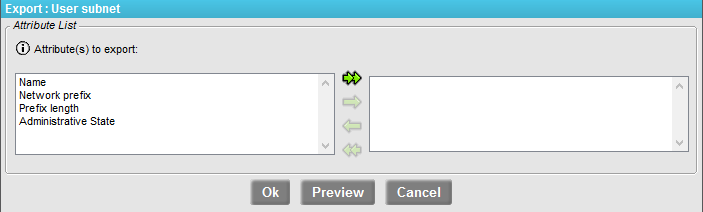
| 1 | Select the attributes you want to export by pushing them to the right with the double right-pointing arrow (objects will be exported with all their attributes) or with the single arrow to the right (objects will be exported with the selected attributes only). One attribute at least must be selected (otherwise, there would be no data to be exported at all; in that case, all of them are exported, as if the double arrow had been clicked). |
If some objects were selected before using the Export function, an Export selection check box enables you to export your selection only. If no object was selected or if the Export selection box is not checked, all objects are exported.
| 2 | Click OK. A dialog box appears, allowing you to either open the result file (_exportXXX.res) or save it. |
The first line of the result file (wrapped in the example below) is the description of the fields present, and the subsequent lines are the exported objects with the selected attributes:
@ipboss_name|ipboss_topology_subnet_network_prefix|ipboss_topology_subnet
_prefix_length|ipboss_topology_subnet_site|ipboss_administrative_state|
Lan_Augsburg|10.49.4.0|24|Site\Augsburg|0
Lan_Bangalore|10.91.2.0|24|Site\Bangalore|0